The Cornell Note-Taking Method: A Complete Setup and Review Guide

·10 min read
Most note-taking systems fail at the same point: the notes get taken, then never used effectively. Students write pages of content during a lecture, review those pages passively before an exam, and wonder why they can't recall the material under pressure. The problem usually isn't the notes themselves — it's the absence of a retrieval system built into the format.
The Cornell method solves this. It was developed by Walter Pauk, an education professor at Cornell University, in the 1950s, and published in his textbook How to Study in College. The system is still in widespread use seven decades later because the underlying structure forces you to do more than record — it forces you to process, retrieve, and consolidate.
The Three-Zone Layout
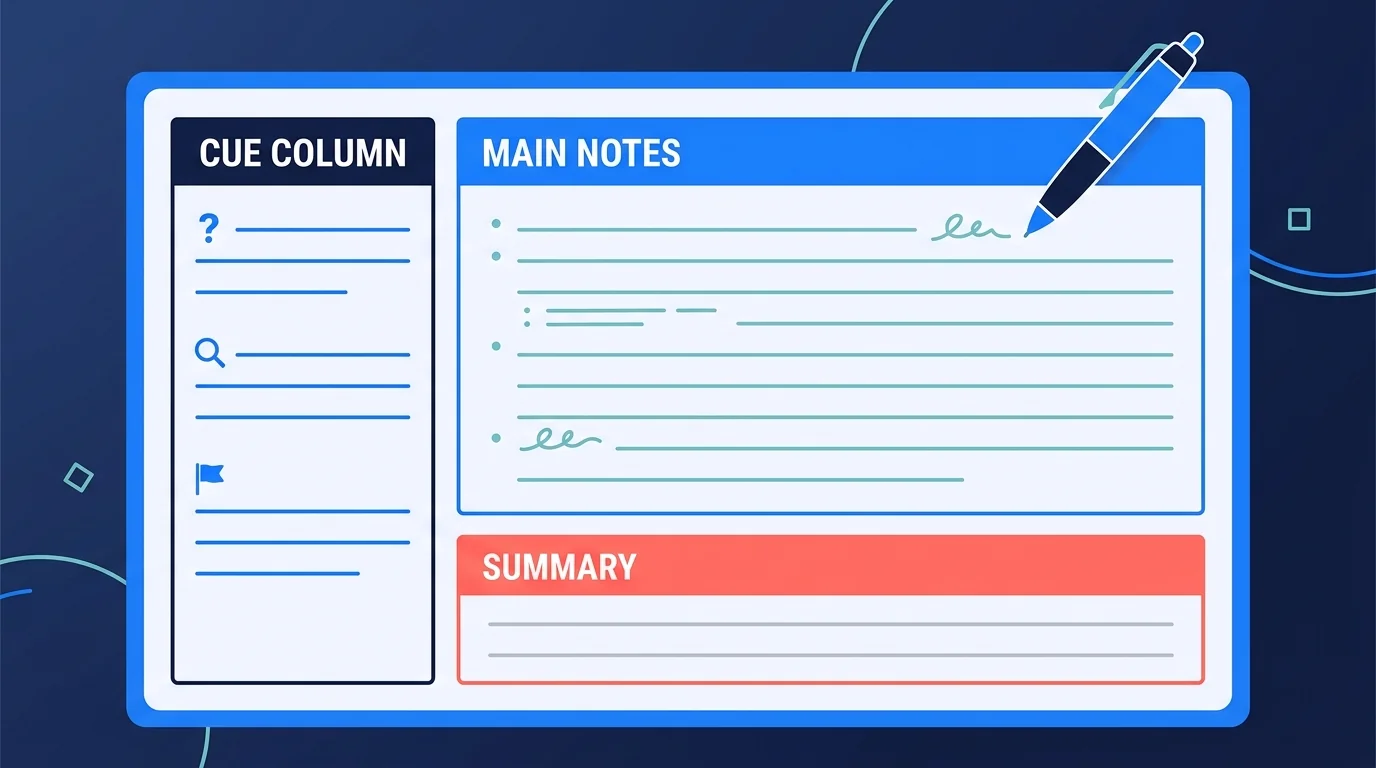
Cornell notes divide a page into three distinct sections. This isn't decoration — the layout is functional, and each zone serves a specific purpose in the learning cycle.
The Main Notes Area (Right Column)
This is the largest section, occupying roughly two-thirds of the page width. You take your notes here during class or while reading: key points, definitions, examples, diagrams, quotes, anything that seems important.
The goal during this phase is capture, not perfection. Write in your own words where possible. Abbreviate. Use bullet points, arrows, and shorthand. You're not transcribing the lecture verbatim — you're extracting the content that matters, in a form you'll be able to work with later.
Avoid writing in complete paragraphs. Dense prose is slow to write and harder to review later. Short phrases and structured lists are faster and more scannable.
The Cue Column (Left Column)
The cue column is narrower — roughly one-third of the page width — and it's left blank during the initial note-taking. You fill it in after class, during the review phase.
This is where the system's real value lives. In the cue column, you write questions, keywords, or prompts that correspond to the content in the main notes area. Each cue should be a trigger that, if you can answer it without looking at the main column, confirms you actually understand the material.
For a history lecture on the causes of the First World War, a cue might be: "What were the main long-term causes?" For a biology lecture on cell division, it might be: "What happens during metaphase?" For a law lecture, it might be a key term: "Offer and acceptance — definition and test."
The cue column transforms your notes from a passive record into an active retrieval tool. Cover the main notes column with a sheet of paper. Read each cue. Try to answer it. Check. That's retrieval practice built directly into the format.
The Summary Section (Bottom)
At the bottom of each page — typically about 5–7 lines — you write a brief summary of the page's content in your own words. This should take no more than two or three minutes per page.
The summary serves two functions. First, it forces synthesis: you can't summarise well without understanding what you've written. If you struggle to produce a coherent summary, it's a reliable signal that your notes need clarification or that you need to revisit the source material. Second, the summaries chain together across pages to give you a compressed overview of an entire lecture, which is useful for quick pre-exam review.
The 5 R's: The Full Cornell Workflow
Pauk described the Cornell method using five stages, often called the 5 R's. The layout is only the first step.
Record
Take notes in the main column during the lecture or reading. Focus on capturing key ideas, not every word. If the lecturer slows down, repeats something, or writes it on the board, it's probably important. Write it down.
Don't worry about the cue column at this stage. Leave it blank. Trying to generate cue questions during a fast-paced lecture splits your attention in a way that hurts both the note-taking and the cues.
Reduce
Within 24 hours of the lecture — the sooner the better — go through your main notes and fill in the cue column. This is the Reduce phase: you're reducing the content to its essential questions and keywords.
The 24-hour window matters. Research on memory consolidation shows that sleep plays a critical role in stabilising new memories. If you wait several days to review your notes, you may find them harder to process and the cue questions harder to formulate because the material has already started to fade.
This phase typically takes 10–20 minutes per lecture page, depending on the density of the notes.
Recite
Cover the main notes column. Read each cue in the left column and say the answer aloud — or write it. Don't skip this step or make it passive. Speaking the answer engages different cognitive processes than silently reading it, and the act of retrieval — whether successful or not — strengthens the memory trace.
Check your answer against the main notes. If you got it right, good. If you didn't, don't just read the correct answer and move on. Try to understand why you missed it and attempt the retrieval again.
Recite is the retrieval practice phase. It's where the learning happens.
Reflect
Ask yourself questions that go beyond the material as written. How does this connect to the previous lecture? What would happen if this principle didn't hold? Where have I seen this idea applied in real contexts? Is anything here surprising, counterintuitive, or in conflict with something else I know?
Reflection — what cognitive psychologists call elaborative processing — strengthens memory by creating additional retrieval pathways. A fact connected to many other pieces of knowledge is much harder to forget than a fact stored in isolation.
This phase takes only a few minutes but is commonly skipped. Don't skip it.
Review
Return to your Cornell notes regularly — not just before exams. A brief 5–10 minute review using the cue column once or twice a week is enough to maintain retention across a semester. The goal is spaced retrieval: returning to the material before you've completely forgotten it, at increasing intervals.
Without regular review, even well-structured Cornell notes degrade in usefulness. The format creates the potential for spaced retrieval practice; you have to actually do it.
Common Mistakes That Undermine the System
Filling in the Cue Column During Class
The cue column is supposed to be filled in during review, not during the lecture itself. Trying to generate questions while simultaneously listening and recording main notes is cognitively overloading and typically produces worse output in all three areas. Keep the left column blank until after class.
Writing the Summary Before Reviewing
The summary should come last on each page — after the main notes and after the cues. Writing it before you've processed the content means you're summarising what you wrote rather than what you understood. The sequence matters.
Treating the Cue Column as a Topic List
The cue column loses most of its value if you write topics ("photosynthesis," "Treaty of Versailles") rather than questions ("What are the two stages of photosynthesis?" "What were the main terms of the Treaty of Versailles?"). Questions force retrieval. Topics just label content.
Never Doing the Recite Phase
Many students use Cornell notes as a nice-looking format but skip the cover-and-retrieve step. Without the Recite phase, Cornell notes are just a two-column layout. The system's value is almost entirely in the retrieval practice it structures.
Copying Down Too Much
The main notes column should contain key ideas, not transcripts. If you're writing as fast as the lecturer is speaking, you're probably transcribing rather than processing. Slow down. Prioritise. Your notes should represent your understanding of what matters, not a verbatim record.
Digital vs. Paper Cornell Notes
Paper remains the most friction-free format for the initial note-taking phase. A 2014 study by Mueller and Oppenheimer found that laptop note-takers tended to transcribe more verbatim content while handwriters processed and paraphrased more, leading to better conceptual retention. The physical act of writing appears to encourage selection and synthesis.
That said, digital Cornell notes have real advantages for the review and retrieval phases. Apps like Notion, Obsidian, and Goodnotes all support Cornell-style templates. Digital notes are searchable, linkable, and easier to carry. If you use a tablet with a stylus, you can preserve the handwriting benefit while gaining the organisational flexibility of digital tools.
A reasonable hybrid: handwrite main notes during class, then transfer or annotate them digitally during the Reduce and Reflect phases. The cue column is particularly easy to manage digitally since it's added after the fact.
How AI Tools Can Extend Cornell Notes
The cue column is the most labour-intensive part of the system. Generating high-quality retrieval questions for every page of notes is genuinely time-consuming, especially when you're managing notes across multiple subjects simultaneously.
AI study tools like CuFlow can do this work for you. Upload your main notes — the content from the right column — and CuFlow's AI generates quiz questions and flashcard cues based on the material. These can serve as your cue column directly, or as starting points that you refine based on your specific exam format.
The AI-generated questions also feed into CuFlow's spaced repetition system, so the retrieval practice doesn't stop at the Recite phase — it continues at algorithmically optimal intervals throughout the semester. You get the structural benefits of Cornell notes and the long-term retention benefits of spaced retrieval without having to manually schedule and track both.
When to Use Cornell Notes
Cornell notes work best for content-dense lectures and structured reading in subjects with a lot of factual or conceptual material: science, history, law, medicine, economics, social science. They're particularly well-suited to any course where exam questions are likely to test specific recall — definitions, processes, dates, causal relationships.
They're less suited to mathematics courses where the primary note-taking task is working through problems step by step, or to seminars where the format is highly discursive and key takeaways don't map neatly to a cue-answer structure. For those contexts, a separate problem-based or concept-map approach often works better.
FAQ
What is the Cornell note-taking method?
The Cornell method is a structured note-taking system developed by Walter Pauk at Cornell University in the 1950s. It divides each page into three sections: a main notes column (right), a cue column (left, filled in after class), and a summary section at the bottom. The format is designed to build retrieval practice into the review process through the Recite step.
How do I set up Cornell notes?
Draw a vertical line about one-third of the way from the left edge of your page. Draw a horizontal line about 5–7 lines from the bottom. The large section to the right of the vertical line is for main notes. The narrow section to the left is the cue column (fill this in after class). The bottom section is for your summary.
What should go in the cue column?
Questions, key terms, and prompts that correspond to the content in the main notes column. The test: if you cover the main notes and read each cue, can you answer it from memory? Good cues should require retrieval, not recognition. Write questions, not just topic labels.
Is the Cornell method better on paper or digitally?
Research suggests handwriting produces better conceptual retention during initial note-taking, likely because it forces selection and paraphrasing rather than transcription. Digital formats are more flexible for the review phases. A hybrid approach — handwritten main notes, digital cue column and summary — captures benefits from both.
How do AI tools work with Cornell notes?
AI tools like CuFlow can generate cue questions and flashcards directly from your uploaded notes, effectively automating the cue column generation process. These questions can then be scheduled for spaced retrieval practice, extending the Cornell review cycle across the full semester rather than limiting it to the days before an exam.